
Remote Audit Guide: AI-Enabled Technology & Benefits
Key Takeaways:
- Remote audits offer greater flexibility, reduced costs, and improved efficiency compared to traditional on-site audits.
- Intelligent Capture and business process automation technologies are essential for successful remote auditing.
- Remote auditing provides a centralized repository with robust search capabilities based on any recorded criteria.
- Organizations can maintain compliance with SOX, SOC 1, and SEC Rule 17 through properly executed remote audits.
Traditionally, audits have been conducted on-site, not because it’s practical or convenient, but because it has become customary over the years. Since the early days of accounting, in-person audits have been an accepted part of doing business.
Most companies conduct internal audits to ensure they maintain compliance with SOX, SOC 1 (Type 1 and Type 2), SEC Rule 17, and other external and internal compliance regulations.
While this approach has worked reasonably well, technology now allows businesses to conduct remote audits, providing greater flexibility, reduced costs, and enhanced peace of mind. But how exactly do you conduct a remote audit? And how can you determine if your business is ready for remote auditing?
What Technology Do You Need to Conduct a Remote Audit?
For organizations interested in conducting remote audits, it’s crucial to recognize that technology is the key enabler.
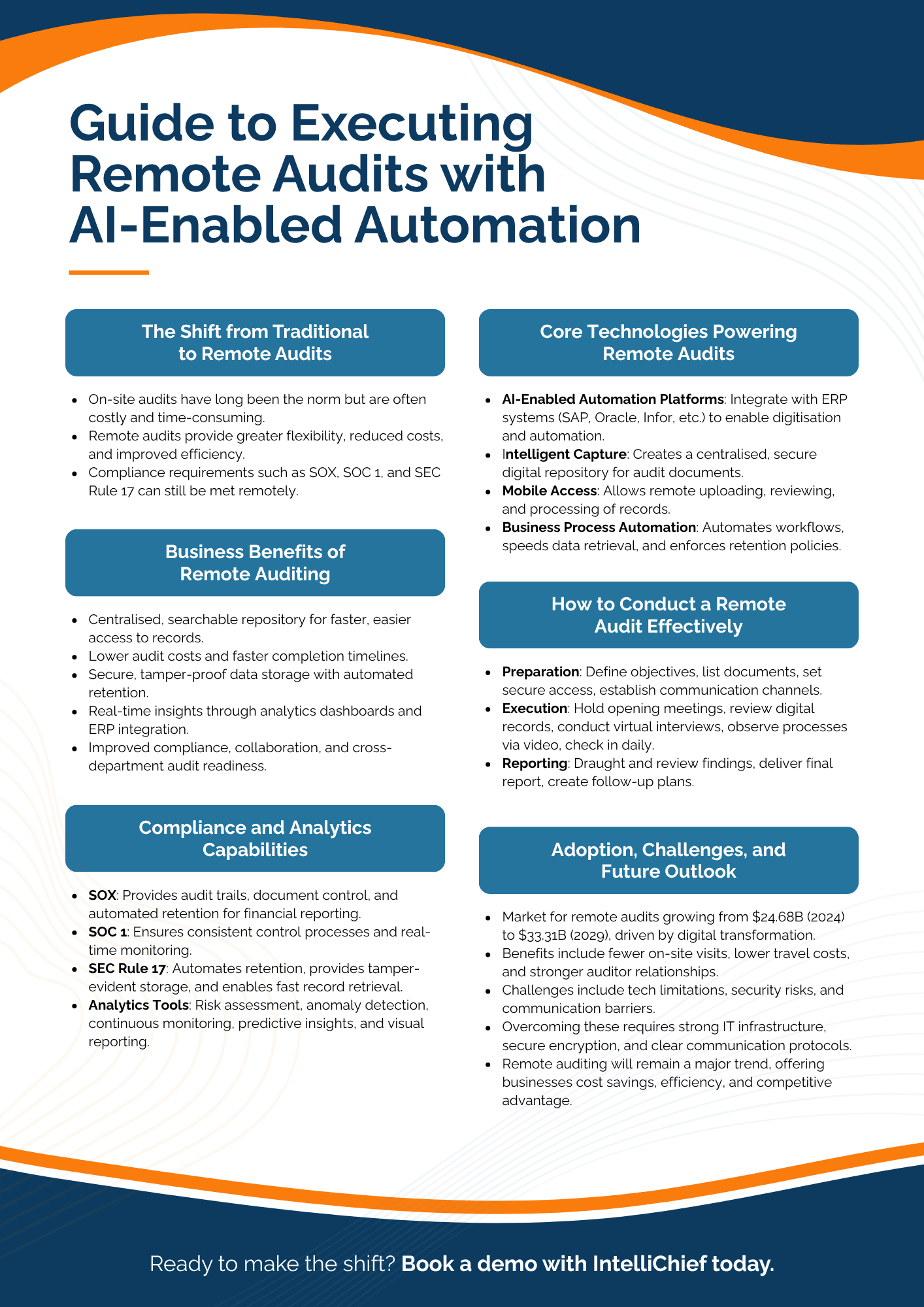
An AI-enabled automation platform that integrates with enterprise-class ERP systems such as SAP ECC, SAP S/4HANA, Oracle E-Business Suite (EBS), Oracle JD Edwards, and Infor Global Solutions provides the foundation for remote auditing capabilities.
This technology facilitates the digitization of enterprise documents, expanding options for managing documentation both in and out of the office. Here’s how it works:
- AI-Enabled Automation Platform: A single, integrated platform that connects with your existing Enterprise Resource Planning (ERP) system and provides the framework for various technologies that make remote audits possible.
- Intelligent Capture: Technology that digitizes documentation and provides a secure, centralized repository from which all documents can be accessed, reviewed, and processed by approved users.
- Mobile Access: Technology that facilitates access to your organization’s digital repository by providing remote access to mobile devices. This not only allows users in the field to process documents without returning to the office but also permits auditors to collect and review documents remotely for faster, less expensive audits.
- Business Process Automation: Sophisticated automation that streamlines workflows and automates processes from start to finish. It helps auditors locate information more quickly and allows organizations to automate records retention using policy-driven automation.
Are Remote Audits Right for Your Business?
An AI-enabled automation platform permits remote access, allowing approved users to source documentation from throughout your organization. It also enables businesses to create and control access for auditors using the same system.
In other words, you can provide temporary credentials to an auditor, allowing them to access the documents they require (and only those documents). This capability is ideal for enterprises that handle large volumes of documentation, such as invoices, sales orders, packing slips, and even onboarding forms.
Another benefit of using an automation platform for remote auditing is that it doesn’t limit your business to specific types of audits. These platforms are designed to be utilized across the enterprise in Accounting, Finance, Legal, Customer Service, Human Resources, and more.
These departments often process thousands of documents per month, which creates a significant burden for your auditor if they are tasked with finding documents manually.
Benefits of Remote Auditing Technology
There are numerous benefits for businesses that conduct remote audits. First and foremost, it simplifies the audit process. Your company provides the auditing firm with a user account that has approved permissions dictating what the auditor can access.
Related transactional documentation is readily available as long as your automation system supports digital paper trails. Leading automation platforms operate as a “single source of truth,” meaning your auditor can find everything they need within a single, integrated system.
Additional benefits of remote auditing technology include:
- Provides a centralized, searchable repository for all audit-related documents, accessible by any criteria (invoice number, vendor name, date, etc.) from authorized locations, enhancing collaboration and compliance.
- Reduces audit costs and accelerates completion timeframes through streamlined processes, automated data retrieval, and reduced manual effort.
- Ensures complete, secure, and continuously organized documentation with automated Intelligent Capture and machine learning, preventing data loss and improving audit readiness.
- Enhances business intelligence and decision-making with real-time data validation through seamless ERP integration, robust analytics dashboards, and customized reporting.
- Improves audit management with automated notifications, detailed audit trails, and concurrent audit capabilities across disparate locations
Remote Audit Technology: Market Growth and Adoption
The global market for process audit services, which includes remote audit solutions, is experiencing strong growth. According to recent industry data, the process audit services market is projected to expand from $24.68 billion in 2024 to $33.31 billion by 2029, representing a compound annual growth rate (CAGR) of 6.1%.
This growth is being driven by digital transformation initiatives, the adoption of agile auditing methodologies, increased demand for remote auditing solutions, and a growing focus on cybersecurity and compliance.
Organizations across industries are recognizing the benefits of digital audit platforms, which streamline operations, enhance data accuracy, and enable continuous compliance with evolving regulatory standards. The expansion of remote audit services reflects a broader shift toward digital-first, data-driven audit practices that improve efficiency and provide greater risk visibility for enterprise operations.
How to Conduct a Remote Audit Effectively
Conducting a remote audit requires careful planning, clear communication, and the effective use of digital tools to ensure accuracy and compliance. By following a structured approach across preparation, execution, and reporting phases, organizations can maximize audit efficiency while minimizing disruptions to daily operations.
1. Preparation Phase
- Define clear objectives: Establish the scope and purpose of the audit
- Identify necessary documentation: Create a list of required documents and records
- Set up secure access: Provide appropriate system access for auditors with proper permission controls
- Establish communication channels: Determine how meetings and discussions will be conducted
2. Execution Phase
- Conduct an opening meeting: Review audit objectives, timeline, and process
- Document review: Allow auditors to examine digital records through the automation platform
- Virtual interviews: Schedule video conferences with key personnel
- Process observation: Use video technology to observe critical processes if necessary
- Daily check-ins: Maintain regular communication to address questions
3. Reporting Phase
- Draft report preparation: Compile findings and recommendations
- Closing meeting: Review findings with management
- Final report delivery: Distribute the complete audit report to stakeholders
- Follow-up plan: Establish a process for addressing any identified issues
Implementing these best practices enables enterprises to conduct remote audits with confidence, leveraging automation and secure collaboration to deliver timely, actionable insights. A well-executed remote audit not only ensures regulatory compliance but also supports continuous improvement and operational resilience.
Ensuring Compliance with Remote Audits
One of the primary concerns for organizations considering remote audits is ensuring compliance with regulatory requirements. With the right remote audit technology, businesses can maintain compliance with key regulations such as:
SOX Compliance
The Sarbanes-Oxley Act requires companies to implement and maintain effective internal controls over financial reporting. Remote audit technology helps by:
- Providing a complete audit trail for all financial transactions
- Enabling controlled access to sensitive financial documents
- Automatically enforcing document retention policies
- Supporting management certification requirements under Sections 302 and 404
SOC 1 Compliance
Service Organization Control (SOC) 1 reports focus on internal controls relevant to financial reporting. Remote audit technology supports SOC 1 compliance by:
- Maintaining consistent control processes across distributed operations
- Providing evidence of control effectiveness
- Enabling real-time monitoring of control performance
- Simplifying the preparation and execution of SOC 1 audits
SEC Rule 17 Compliance
SEC Rule 17a-4 establishes requirements for record retention, indexing, and accessibility. Remote audit technology ensures compliance by:
- Automating retention schedules based on document types
- Providing tamper-evident storage for electronic records
- Enabling quick retrieval of records during regulatory examinations
- Supporting the required format and accessibility standards
Leveraging Data Analytics in Remote Audits
Modern remote audit technology incorporates advanced data analytics capabilities that significantly enhance the audit process. These analytics tools provide auditors with deeper insights and help identify patterns or anomalies that might not be apparent through traditional sampling methods.
Key analytics capabilities in remote auditing include:
- Risk Assessment: Analytics help identify high-risk areas that require additional scrutiny
- Anomaly Detection: Automated identification of unusual transactions or patterns
- Continuous Monitoring: Real-time analysis of transactions as they occur
- Predictive Insights: Forward-looking analysis based on historical patterns
- Visualization Tools: Graphical representations that make complex data more understandable
Organizations with advanced analytics capabilities experience greater value from their audit processes, including improved risk management, enhanced audit quality, and greater efficiency.
What Happens After You Embrace Remote Auditing Technologies?
Once you start to conduct audits remotely, it doesn’t necessarily mean the end of on-site meetings. These will continue to occur, although much less frequently, and these interactions should be streamlined due to the added organization and file access provided by your automation platform.
Collaboration with auditors and your department heads will be accelerated for faster resolutions. The company-auditor relationship will remain strong, and perhaps even improve, thanks to the added efficiency of digital processes.
It’s still important to meet face-to-face occasionally, but in an increasingly digital world, these types of interactions are already being supplemented with meetings conducted over video conferencing platforms. Additionally, auditors are freed from long stints as a company’s on-site guest — something all parties appreciate.
Your auditors will no longer need to travel extensively, billable hours will be reduced, and you will gain greater control over audit costs. Your company will ultimately avoid audit projects exceeding projected timetables and budgets, resulting in mutual satisfaction in your fiscal relationships.
As remote work continues to transform the business landscape, the adoption of remote audit practices will likely accelerate. Remote auditing will remain a significant trend in the coming years.
Addressing Remote Audit Challenges
While remote audits offer numerous benefits, they also present certain challenges that organizations should be prepared to address:
Technology Limitations
Some organizations may face technical issues related to internet connectivity, system compatibility, or software limitations. To mitigate these challenges:
- Ensure all participants have adequate internet bandwidth
- Test all systems and applications before the audit begins
- Have technical support readily available during the audit process
Security Concerns
Remote audits involve sharing sensitive information outside the organization’s physical boundaries. To maintain security:
- Implement strong authentication methods
- Use encrypted communication channels
- Limit access to only the necessary information
- Monitor and log all audit-related activities
Communication Challenges
Remote settings can sometimes hinder effective communication. To overcome this:
- Establish clear communication protocols at the outset
- Schedule regular check-in meetings
- Use video conferencing when possible to maintain a personal connection
- Document all key discussions and decisions
Embracing Remote Audit for Better Business Outcomes
Remote auditing represents a significant advancement in how organizations approach compliance and control verification. By leveraging AI-enabled automation platforms that integrate with enterprise-class ERP systems, businesses can conduct more efficient, cost-effective, and thorough audits without the limitations of traditional on-site approaches.
The benefits of remote audit are clear: reduced costs, improved efficiency, enhanced data access, better analytics capabilities, and the ability to maintain compliance with key regulations such as SOX, SOC 1, and SEC Rule 17.
As remote audit technology continues to evolve, organizations that embrace these capabilities will gain a competitive advantage through improved risk management, more timely insights, and better allocation of resources.
For businesses looking to enhance their audit processes while reducing costs and improving outcomes, implementing remote audit capabilities should be a strategic priority. By partnering with technology providers that offer robust, secure, and integrated solutions, organizations can transform their audit approach and achieve better business results.
To learn more about how remote audits can help your business save money, preserve time, and maintain compliance, contact IntelliChief today.